
How to Create A
YouTube Campaign on Google Ad
Take your advertising to the next level and start showcasing your ads on YouTube!
As we all know, YouTube is one of the most visited and used online platforms alongside Facebook, Twitter and Instagram. This clearly tells you it’s definitely a great idea to use this platform to get people to know your business. Video campaigns, as well as the other marketing strategies are a great start to the buying funnel. They are often used to, first and foremost, create brand awareness, which then could potentially lead to an interest, followed by desire, and finally a purchase.
1. Business YouTube Account
Create a YouTube account for your business where you will be uploading your video ads so you can later import them into your Google Ads Video Campaign.
Keep in mind the videos should be: precise, short enough to keep people’s attention (don’t let them get bored and click away); informative, make sure you cover everything important people would like to know about your business; engaging, allow people to imagine how their lives would be so much better with your products/services; and last but not least, include a call to action where you define what action you want people to take. Whether it is visiting your website, calling your business, or even watching more YouTube videos on your Channel.
2. Choose your audience
Based on location, interest, affinity, choose who you want to see your video ads. This step is important because it will definitely help you reach your potential clients faster and easier. It will also help you reduce irrelevant costs because you will be allocating your budget to people of interest, which leads us to our next step.
3. Define your budget
Whether it is a daily budget or a monthly budget, define how much you would be willing to invest on your campaign. Keep the costs per click in mind, the ad schedule, and your location targeting. Make sure it’s reasonable, otherwise you will struggle with budget limitations and impression share. Your budget determines how often and how prominently your ads will be featured.
1. Goals
I allow myself 2 15-minute breaks during the day, at 11:00 am and 3:00 pm, to do whatever I need to do that isn’t work related. I also take smaller breaks throughout the day to stand up, walk to the kitchen and grab a glass of water to, not only stay hydrated, but to give my brain a little rest. This has significantly helped with time management, giving myself a designated time to do other stuff.
- Once you are on your Google Ads account, choose the option to create a new video campaign.
- Select the goal you want your campaign to focus on:
- Sales
- Leads
- Website traffic
- Product/Brand Consideration
- Brand Awareness & Reach
2. Budget
- Now that you have defined a budget you need to set up a bidding strategy, which will determine how your budget will be spent. You can choose to manage your bids manually or you can opt for automated biddings and let Google adjust bids to get the most within your budget.
3. Targeting
- Choose the networks you want your ads to show and reach people based on their geographical locations, interest, and/or language preferences. You can even add content exclusions that seem irrelevant or inappropriate to your brand, service or product.
4. Ad Groups
-
Organize your ads by using ad groups. You may section these ad groups whichever way you find comfortable and easy to manage and understand the data. You can have them sectioned by product categories, service tiers, goals, the options are unlimited. You may define who you want to reach based on demographics and audiences.
You can even use relevant keywords, topics and placements to narrow even more yout targeting.
5. Ads
- Choose which videos you will use on each ad group and you only need to copy and paste the YouTube video URL.
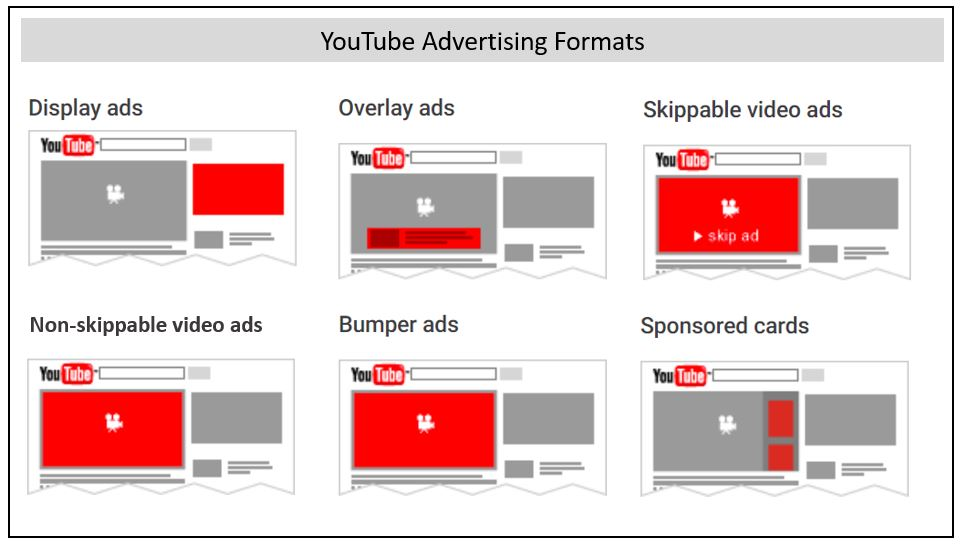
- Select how you want to showcase your ad from different ad formats you can choose from depending on the goal you had selected when creating the campaign.
- As always, make sure you enter a call to action so you can encourage people to interact with your ad, visit your website, call you, fill out a form, etc.
- Use a headline. Make sure it is captivating and that it will interest the viewers.
See?! Easy right? I hope you found this helpful. See you in the next post! Good luck!

First Rank Digital
First Rank Digital was created with the intention of ensuring our client’s online success and providing a premium customer service experience. We understand that for any business, every dollar of your investment is important, and with First Rank Digital you can feel comfortable knowing that a positive ROI is our top priority.